Create a Professional Website with AI: The Complete Guide [2026]

You need a website. Not in three months. Not for $5,000. Right now, and at a price that won't make you wince.
If you're a freelancer, contractor, coach, consultant, or small business owner, you know the situation: without a website, you lose customers. People search for your name on Google, find nothing (or worse, find a competitor), and move on. Every week without an online presence is revenue slipping through the cracks.
The problem? Traditional options are either too expensive, too time-consuming, or both. Paying an agency $3,000 for a showcase site, waiting 6 weeks, then having to negotiate every single change... in 2026, that shouldn't still be the norm.
Artificial intelligence has changed the game. Since 2024, tools capable of generating websites have been multiplying. Some are excellent. Others are smoke and mirrors. And most fall somewhere in between.
This guide cuts through the noise. We'll review every approach to creating a website with AI, their real advantages, their real limitations, and most importantly, how to get a professional result without sacrificing your weekend or your quarterly budget.
No sugarcoating, no sponsored rankings. Just what works, what doesn't, and why.
What is an AI website builder?
An AI website builder is a tool or service that uses artificial intelligence to generate all or part of a website: the structure, design, copy, images, and code. Instead of starting from a blank page and building everything manually, you provide a few details (your business, your style, your needs) and the AI produces a first version in minutes.
But be careful: "built by AI" doesn't mean the same thing for everyone.
Three levels of AI in web creation
Level 1 — The basic assistant. This is what most "AI" builders do today. You pick a template, the AI fills in the text with generic content and adjusts the colors. In reality, it's a glorified template with a chatbot on top. AI is a marketing veneer, not the engine behind the creation.
Level 2 — Full generation. The AI genuinely creates the site structure, writes content based on your business, and selects an appropriate layout. That's already much better, but the result rarely comes out "publish-ready" as is. You need to review, adjust, and correct.
Level 3 — AI + human. AI does the heavy lifting (architecture, copywriting, design), then a human reviews, refines, and optimizes. The end result is a website that looks like what a skilled freelancer would have produced, but in a fraction of the time and cost.
The majority of tools on the market sit at Level 1, sometimes Level 2. Level 3 is still rare — and yet it's the one that delivers the best results. For a deeper look at what each approach actually costs, see our full breakdown of website pricing.
AI doesn't replace human expertise. It accelerates it. A website generated by AI without review is like a first draft sent without proofreading: it might pass, but it will never make a great impression.
The different approaches to building a website with AI
In 2026, three major families of solutions exist for creating a website with artificial intelligence. Each has its own logic, strengths, and blind spots.
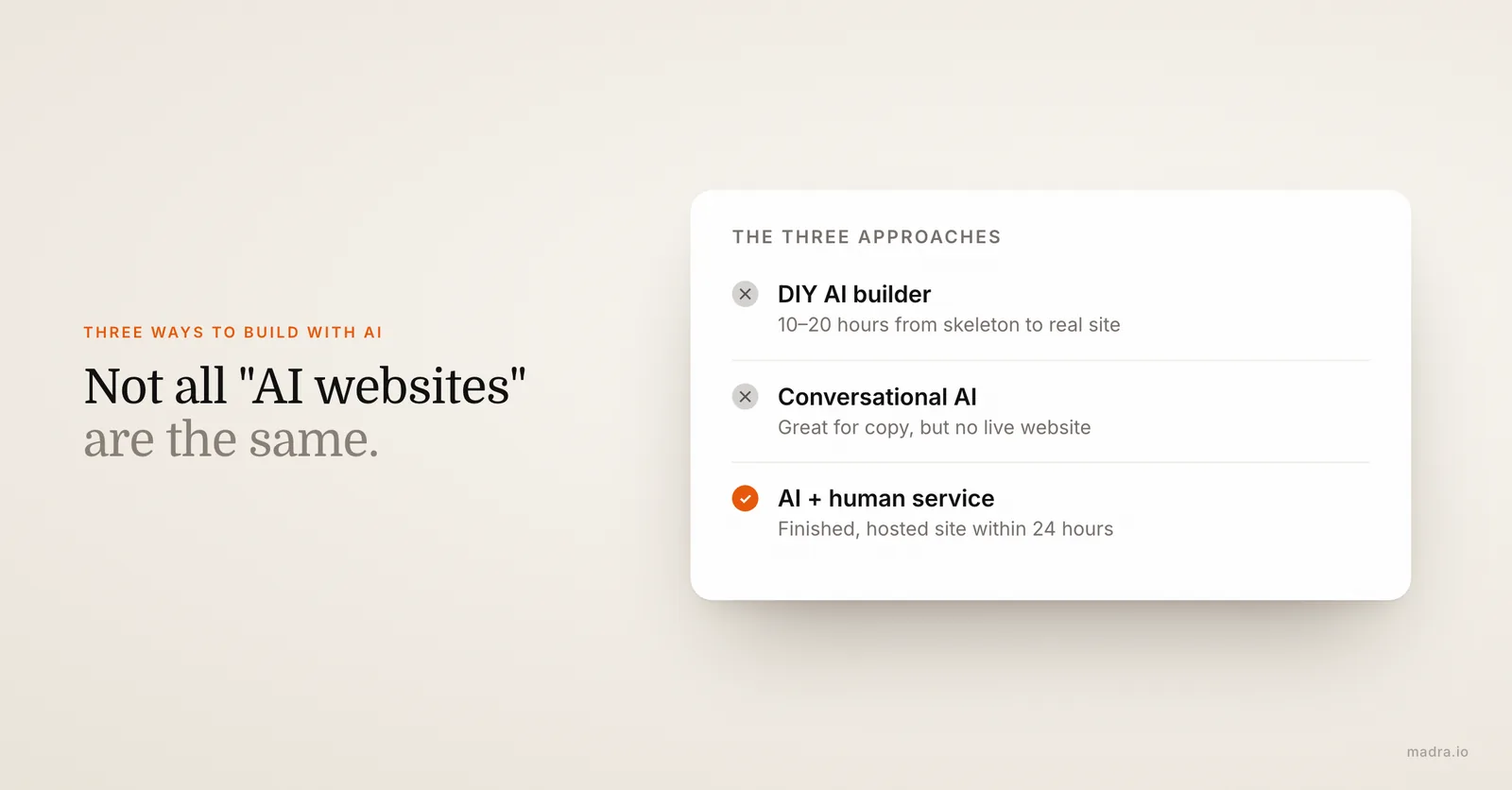
Approach 1: DIY with an AI builder (Wix, Hostinger, Jimdo...)
How it works
You sign up on a platform, answer a few questions, and an "AI assistant" generates your site. You can then customize it through a visual editor (drag & drop). This is the most well-known option, pushed by massive advertising campaigns.
The real advantages
- Low entry price — often between 0 and $15/month for basic plans
- You keep full control — every pixel is editable if you want
- Plenty of templates — there's one for every industry
- Easy integrations — online store, forms, social media
The real limitations (that the ads won't tell you)
- "A website in 5 minutes" is a myth. AI generates a skeleton in 5 minutes, sure. But between that skeleton and a site you'd actually show to a client, there are easily 10 to 20 hours of work. Rewriting copy, swapping images, adjusting layout, checking responsive design, configuring SEO...
- The generated text is bland. The AI on these platforms produces ultra-generic content. "Welcome to our website. We offer quality services." That's not going to convince a prospect.
- SEO is on you. The technical basics are there, but title tags, meta descriptions, heading structure, internal linking — all of that is your job. And if you don't know what those are, your site will be invisible on Google.
- The "template look" shows. Despite the promises, a trained eye immediately recognizes a Wix or Hostinger site. It's not a dealbreaker, but it doesn't project a premium image.
- You're on your own when problems arise. A display bug on mobile? A form that doesn't work? You have to find the solution yourself in the documentation or on a forum.
Verdict: great if you have time, a decent eye for design, and you're willing to learn. Less suitable if you want a professional result quickly without the hassle.
Approach 2: Conversational AI (ChatGPT, Claude, Gemini...)
How it works
You use an AI chatbot to generate your website content: page copy, service descriptions, FAQ, blog posts. Some can even produce basic HTML/CSS code.
The real advantages
- Ideal for content — writing copy, structuring arguments, rephrasing
- Fast and flexible — you can iterate as many times as needed
- Helps with strategy — a good prompt can help you structure your offer and messaging
- Free or very affordable — the basic versions are more than enough for content
The real limitations
- A chatbot doesn't make a website. You have text, code, ideas — but not a live website. You still need to host it, design it, test it, and deploy it.
- No design. ChatGPT can generate HTML, but the visual result is rudimentary. Design is much more than code: it's usability, visual hierarchy, rhythm.
- No maintenance. Your ChatGPT-generated site doesn't update itself. No automatic SSL certificate, no backups, no monitoring.
- The "almost good enough" trap. Generated code often looks correct but contains accessibility, performance, or responsive issues that only a developer would catch.
Verdict: excellent as a complementary tool for writing and strategic thinking. Not sufficient as a standalone solution for having a live website.
Approach 3: Turnkey AI-assisted service
How it works
You provide your information (business, logo, needs), an AI pipeline generates the site, then a human team reviews, adjusts, and optimizes the result. You receive a finished website, hosted and live, without touching a single technical tool.
The real advantages
- Zero technical skills required — you don't touch anything
- Speed — a website delivered within 24 hours, not in 3 weeks
- Professional result from the start — human review eliminates AI approximations
- Everything included — hosting, domain, SEO, SSL, maintenance, updates
- Ongoing support — need to change a text or add a section? It's handled for you
The real limitations
- Less direct control — you don't manipulate the editor yourself (which is also an advantage if you don't want to)
- Monthly subscription — the cost is recurring, not one-time
- Dependency on the provider — always check that you can export your site if you cancel
Verdict: the best option for those who want a professional result quickly without getting involved in the technical side. The quality-to-price-to-time ratio is unbeatable compared to an agency.
Want a professional site without spending hours on a builder?
Fill out the form, send your logo, and get your site within 24 hours. Hosting, domain, and SEO included.
Honest comparison: free DIY vs agency vs professional AI service
Let's skip the marketing talk. Here's a table that compares the three main options without cutting any corners. Prices and timelines reflect the 2026 market reality for a 5 to 7 page showcase website.
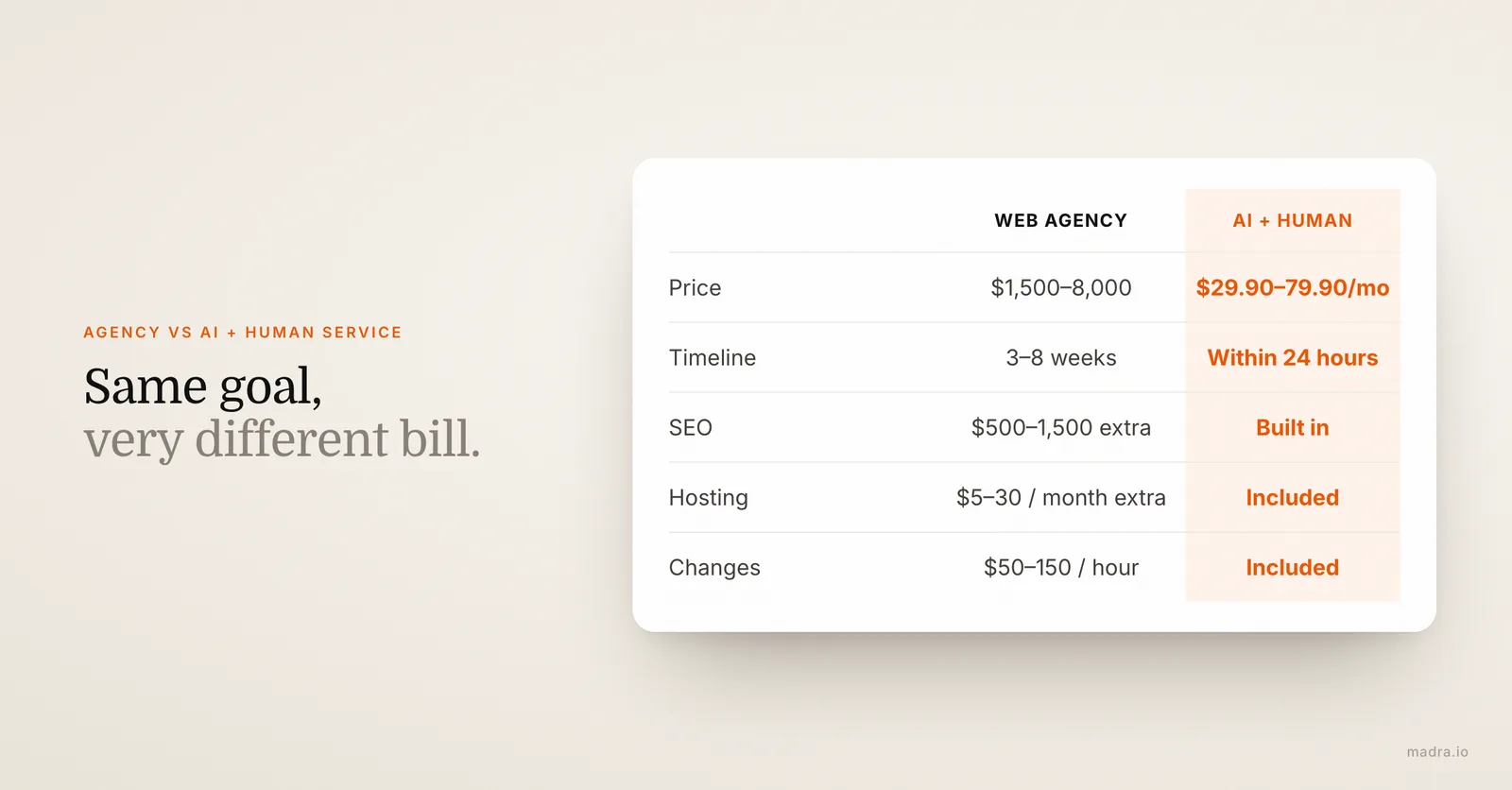
| Criteria | DIY (Wix, Hostinger...) | Traditional web agency | AI + human service |
|---|---|---|---|
| Price | $10-30/month + your time | $1,500-8,000 (one-time) + maintenance | $29.90-79.90/month all-inclusive |
| Actual timeline | 2-5 days (spending several hours/day) | 3-8 weeks | Within 24 hours |
| Design quality | Decent (customized template) | Good to excellent | Good (custom design) |
| SEO included | Technical basics, configuration is on you | Often an add-on ($500-1,500) | Optimization built in from the start |
| Hosting | Included in the subscription | Usually separate ($5-30/month) | Included |
| Domain name | Paid or included depending on plan | Rarely included | Included |
| Modifications | Yourself, whenever you want | Billed as extras ($50-150/hour) | Included in the subscription |
| Skills required | Medium (design, SEO, copywriting) | None | None |
| Support | Documentation + community | Depends on contract | Direct with the team |
| Site ownership | Depends on the platform | Usually yes | Check the terms (at Madra: full export available) |
What this table doesn't show
There's one cost that's systematically overlooked in these comparisons: the value of your time.
If you're a contractor charging $50 per hour, spending 20 hours tinkering with a Wix site "costs" you $1,000 in unbilled time. Not counting the frustration and mental energy spent on something that isn't your core business. Whether you're a tradesperson, a restaurant owner, or looking for an affordable website for your small business, the problem is the same.
Agencies, on the other hand, have a different problem: timelines. Six weeks for a showcase site means six weeks without an online presence. And back-and-forth approval rounds can easily double that timeframe.
A human-assisted AI service compresses both dimensions. Creation time drops to 24 hours, and you don't have to do anything on the technical side. The trade-off is a monthly subscription rather than a one-time payment — but with hosting, domain, and modifications included, the math speaks for itself.
The 5 pitfalls to avoid when building your site with AI
AI makes website creation easier, but it also opens the door to mistakes that beginners don't see coming. Here are the five most common pitfalls — and how to sidestep them.
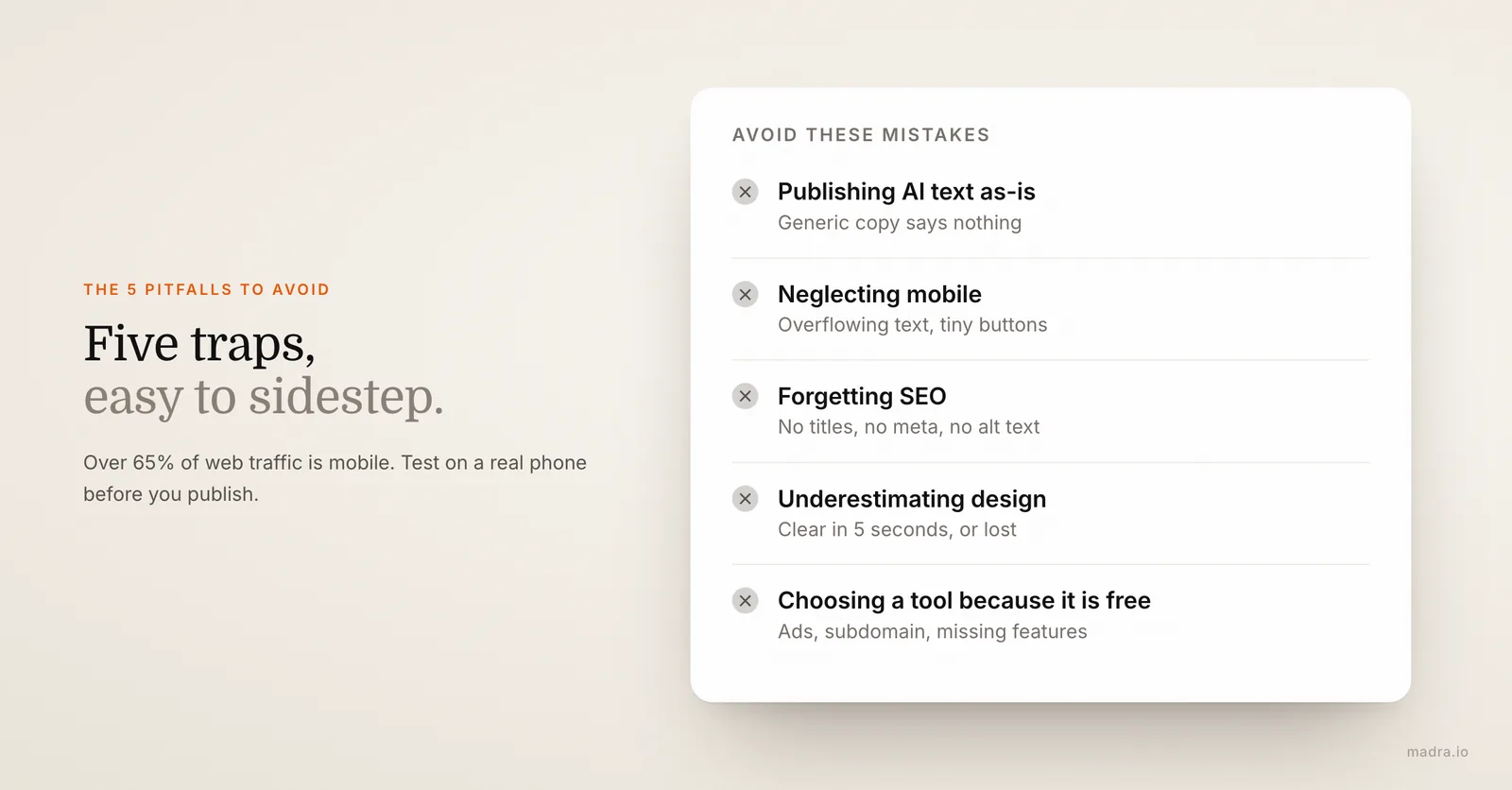
Pitfall 1: Publishing AI-generated content as-is
This is the number one mistake. AI produces text that "sounds good" but says nothing specific. Phrases like "we put our expertise at the service of your success" give your visitor zero concrete information. Worse, Google knows how to detect generic content and penalizes it in search results.
The solution: use AI as a starting point, never as a finished product. Add specific details about YOUR business, YOUR clients, YOUR method. What makes the difference is specificity.
Pitfall 2: Neglecting mobile responsiveness
In 2026, over 65% of web traffic comes from mobile devices. Yet most AI-generated sites are designed desktop-first. The AI produces a design that looks great on a large screen, but when you shrink the window... text overflows, buttons are tiny, images break the layout.
The solution: ALWAYS test your site on mobile before publishing. Not just by resizing your browser window — grab your phone and actually browse the site. If you're using a service that handles the creation for you, make sure they explicitly mention mobile optimization.
Pitfall 3: Forgetting SEO fundamentals
A website invisible on Google is a useless website. And unfortunately, AI doesn't handle SEO for you — not on DIY builders, at least. The classic mistakes: no custom title tag, missing meta descriptions, images without alt attributes, slow loading speed, no structured data.
The solution: either learn the basics of SEO yourself (budget at least a full day of reading and practice), or choose a solution that integrates optimization from the start. A minimum SEO checklist: a unique title per page, a 150-160 character meta description, properly structured headings (H1, H2, H3), compressed images with relevant alt text, and a loading time under 3 seconds.
Pitfall 4: Underestimating the importance of design
AI can assemble blocks, choose cohesive colors, and place text in sections. What it can't do (not yet): create a unique visual identity, fine-tune white space, visually prioritize information to guide the visitor's eye toward the contact button.
Design isn't just about "does it look nice." It's about "does the visitor understand in 5 seconds what you do and how to contact you." A site that answers this question converts. A site that doesn't is just an online brochure.
The solution: if you're going the DIY route, draw inspiration from sites that work in your industry (not generic templates). If you're delegating, make sure your provider understands your business and your audience, not just your logo and colors.
Pitfall 5: Choosing a tool because it's free
Free plans on website builders are designed for one thing: converting you into a paying user. They come with limitations that make your site look unprofessional: builder ads displayed on your site, subdomain (yoursite.wix.com instead of yoursite.com), no SSL certificate on some plans, limited bandwidth, missing basic features.
The solution: never compare a free plan with a paid service. Compare the cheapest paid plan of the builder ($10-20/month) with the alternatives. At that price point, the differences narrow down and the real question becomes: "do I have the time and desire to do this myself?"
Don't want to fall into these pitfalls?
Madra handles the creation, SEO, responsive design, and layout for you. Professional result in 24 hours, starting at $29.90/month.
How to get a truly professional website with AI
Regardless of the solution you choose, certain fundamentals don't change. Here's what separates a professional site from an amateur one — and how to get there.
The 7 criteria of a professional website
Before talking about tools or processes, let's align on what "professional" actually means:
- Fast loading — under 3 seconds on mobile (53% of visitors leave a site that takes more than 3 seconds to load)
- Cohesive design — a color palette, one or two fonts, consistent spacing
- Mobile first — smooth navigation on smartphone, thumb-friendly buttons
- Clear content — within 5 seconds, the visitor knows what you do, who you serve, and how to contact you
- Solid SEO — you show up on Google when a prospect searches for your services in your area
- Active HTTPS — the padlock in the address bar, non-negotiable in 2026
- Legal notices in order — legally required, too often forgotten
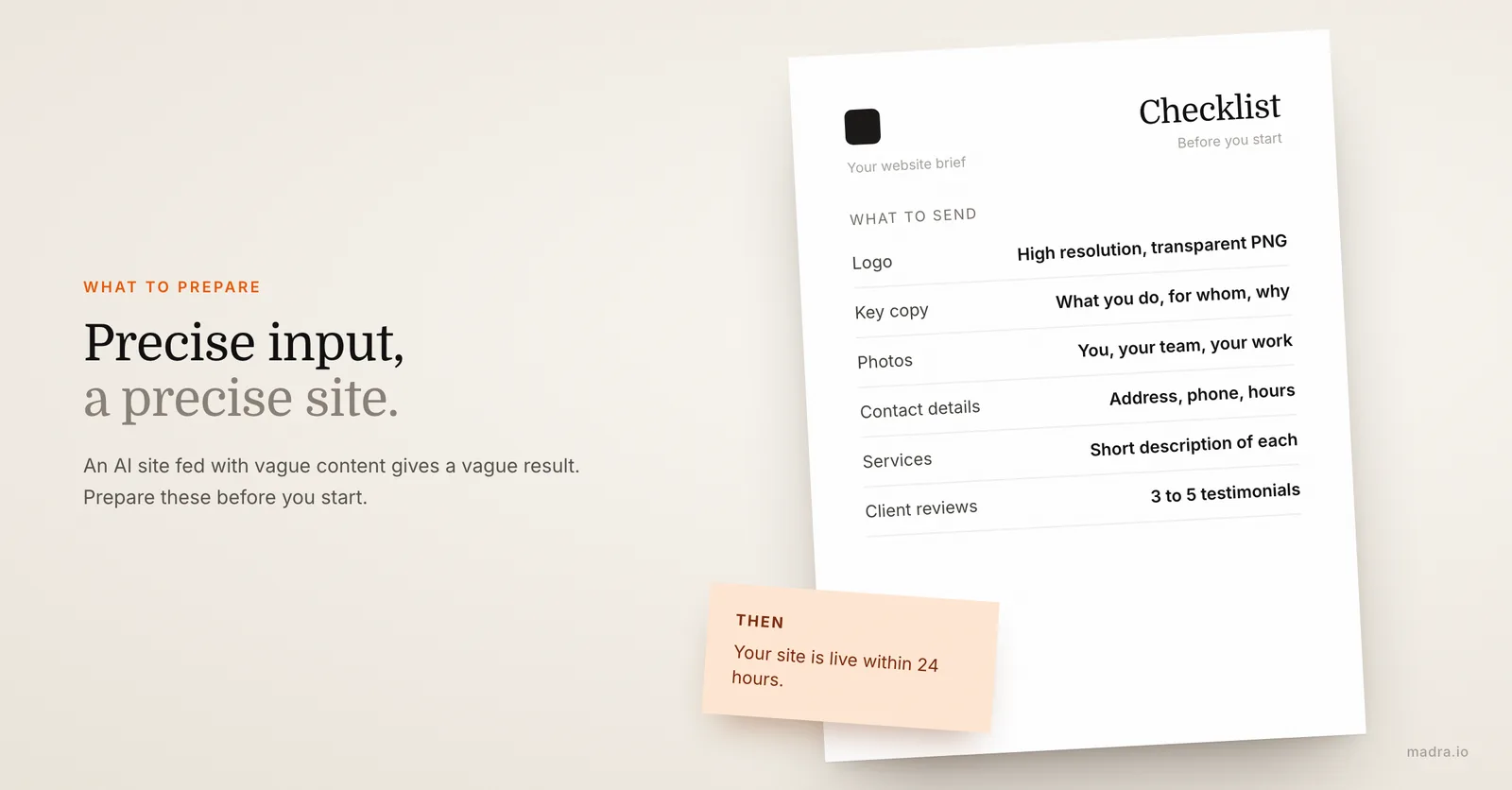
What to prepare before creating your website
Whether you use a DIY builder or a turnkey service, you'll save time (and improve quality) by preparing these elements in advance:
- Your logo — in high resolution (PNG with transparent background if possible)
- Your key copy — at a minimum, your value proposition (what you do + who you serve + the main benefit)
- Your photos — of you, your team, your work. Real photos convert better than stock images
- Your contact information — address, phone, email, business hours, social media
- Your list of services/products — with a short description of each
- Your client reviews — 3 to 5 testimonials make a world of difference in terms of credibility
The quality of your website directly depends on the quality of the information you provide. An AI site fed with vague content will produce a vague result. An AI site fed with precise, authentic content will produce a result that truly represents you.
The step-by-step process with an AI-assisted service
To make things concrete, here's how it works with a service like Madra (it's the process we know, but similar services exist):
Step 1 — You fill out a form (5 minutes). Your company name, business, target audience, services, contact details, style preferences. No need to write a 15-page brief. Short and honest answers are all it takes.
Step 2 — You send your logo and visuals. Everything you have: logo, team photos, portfolio images. If you don't have photos, the service adapts with cohesive visuals.
Step 3 — AI generates your site (behind the scenes). The artificial intelligence analyzes your information, builds the site architecture, writes the copy, and selects the layout. This is where AI saves entire days of work.
Step 4 — Human review. A human reads every page, adjusts the design, refines the wording, checks responsiveness, and optimizes SEO. This step is what makes the difference between an "AI-generated site" and a "professional website."
Step 5 — You receive your site within 24 hours. Hosted, live, with your domain name, SSL activated, and SEO configured. You approve it, request adjustments if needed, and it's online.
Step 6 — Ongoing modifications. Your business evolves, your prices change, you add a new service? You send a message and it's updated within 24 hours. No extra charges — it's included in the subscription.
Prefer to do it yourself?
That's perfectly valid. Here's the optimized process if you choose the DIY route:
- Pick your builder — Wix, Squarespace, or Hostinger are the most accessible in 2026
- Use conversational AI alongside it — generate your copy with ChatGPT or Claude, then personalize it with your specific details
- Start from a template in your industry — don't build from scratch, adapt
- Focus on the homepage and contact page — these are the two most visited pages, the rest can wait
- Test on mobile before publishing — repeating this because it's the first thing people forget
- Set up basic SEO — title, meta description, Google Search Console
- Publish even if it's not perfect — an imperfect live website is better than a perfect website that never goes online
Expected budget: $15-25/month for the builder + a domain name ($10-15/year) + your time (15-30 hours minimum for a decent result).
Frequently asked questions
How much does it cost to create an AI-built website?
Prices vary widely. Free DIY tools exist but remain limited. Paid solutions like Wix or Hostinger cost between 10 and $30/month. A turnkey AI-assisted service like Madra starts at $29.90/month with everything included (hosting, domain, SEO, modifications). A traditional agency typically charges between 1,500 and $10,000 for a showcase website.
Can AI really create a professional website?
Yes, but not on its own. AI excels at generating content, suggesting structures, and speeding up the creation process. However, a truly professional result always requires human review, design adjustments, and technical optimization that AI alone hasn't fully mastered yet.
What's the difference between an AI-built website and one made by a developer?
A developer starts from scratch and codes every element custom — it's time-consuming and expensive. AI generates a solid foundation in minutes, which is then refined. The final result can be equivalent in quality, especially when human review completes the AI's work. The real difference is time and cost.
Will my AI-built website rank well on Google?
That depends entirely on the solution you choose. A DIY site will have SEO basics if you configure them correctly. A service like Madra integrates SEO optimization from the start: title tags, meta descriptions, heading structure, page speed, and structured data. SEO isn't just about AI — it's about methodology. You can also explore the differences between free and professional AI websites to understand what impacts rankings.
How long does it take to create a website with AI?
With a DIY tool, expect 2 to 5 days for a decent result (spending several hours per day). With an AI-assisted service like Madra, the site is delivered within 24 hours without you needing to handle anything on the technical side.
Can I use ChatGPT or Claude to create my website?
You can use them to write your website content (texts, descriptions, FAQ) and even generate basic HTML/CSS code. But these tools don't provide hosting, a domain name, tested responsive design, or maintenance. They're a great starting point for content, not a complete solution.
Will my website be unique or look like other sites?
With DIY tools, you start from a template shared by thousands of users — customization is limited. Services that combine AI and human expertise create designs tailored to your business and brand identity. It's not copy-paste from a template.
What happens if I want to modify my website after it's created?
It all depends on the solution. With a DIY tool, you make changes yourself (which takes time). With an agency, every change is billed as an extra. At Madra, modifications are included in the subscription: you send your request and it's done within 24 hours.
Are AI-built websites mobile-friendly?
Good tools generate responsive code by default. But "responsive by default" and "mobile-optimized" are not the same thing. A truly mobile-optimized site requires adjustments: button sizes, spacing, loading speed on mobile networks. That's often where human review makes the difference.
Do I own my AI-built website?
That depends on the provider — always read the terms. At Madra, you retain ownership of all your content (texts, images, logo) and you can request a full export of your site if you cancel. That's not the case everywhere, so check before committing.
Key takeaways
Creating a website with AI in 2026 is possible and accessible. But the result depends enormously on the approach you choose and the level of involvement you're willing to put in.
If you have time and enjoy tinkering, a DIY builder paired with conversational AI will give you a solid result for $15-25/month. Just plan on at least 20 hours of work.
If you have the budget and want absolute customization, a web agency remains a valid option — as long as you accept the timelines and price tags that come with it.
If you want a professional result quickly without spending your evenings on it, an AI service assisted by humans is probably the best compromise. That's the space occupied by services like Madra: you provide the essentials, AI and a team handle the rest, and you have your website within 24 hours.
Whichever option you choose, remember three things:
- Never publish AI content without personalizing it
- Always test on mobile
- An imperfect live website is better than a perfect website that doesn't exist
Your next client is searching for your services on Google right now. Make sure they find you.
Ready to launch your site?
Quick form, 24-hour delivery, everything included from $29.90/month, no commitment.
Create my site now